
AiDot – Smart Home Life
AiDot IncLifestyle
3.8880.00 Reviews
- Version
- 2.24.2
- Installs
- 500.00K
- Age Rating
- Everyone
Screenshots
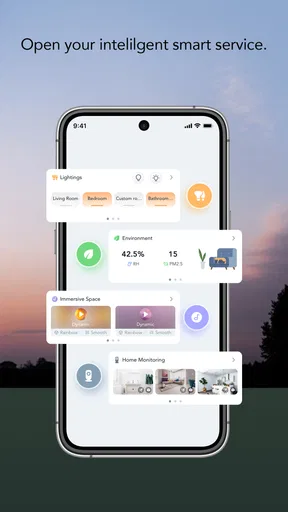
Our Review of AiDot – Smart Home Life
 Analysis by Appyee
I approached AiDot – Smart Home Life as a practical lifestyle app rather than another gadget showcase. Its purpose is to bring compatible home devices into one place, with an emphasis on making everyday spaces more colorful and easier to manage. That sounds simple, but the real question is whether one control app makes your routine smoother or merely adds another layer between you and the devices you already own.
After spending time with it, my view is fairly clear: this is most appealing to people who are building their home around AiDot-compatible products and want a shared control point. It is less convincing for someone who owns a mixed collection of smart devices and expects one app to replace every manufacturer’s software without compromises.
What I considered before recommending it
When I judge a smart-home app, I do not begin with how attractive its interface looks. I first ask whether it reduces the number of steps needed for ordinary actions. Can I reach the device I need quickly? Does the app help me organize a growing collection? Is it useful when I am tired, busy, or away from home? A control center that looks polished but makes simple changes difficult is not a good bargain, even when it costs nothing.
I also look at how focused the app is. A dedicated ecosystem app can be easier to understand than a broad platform trying to support every brand, but it may also leave gaps if your home contains products from several manufacturers. That trade-off matters here because AiDot is not presented as a general-purpose lifestyle planner. It is centered on connected home devices, particularly the kind of equipment where lighting, atmosphere, and security are part of the daily experience.
The app is free to use, carries an Everyone age rating, and comes from AiDot Inc. Its Android compatibility reaches back to version 6.0, which makes it accessible on many older phones as well as newer ones. The current release is 2.24.2. Those details are useful if you are trying to install it on a spare handset or an older family device rather than your main phone.
Popularity does not prove that an app is right for everyone, but it does provide some context. AiDot has passed 500K installs, with an average rating of 3.8 from around 2.5K ratings and roughly 880 written reviews. I read that as a sign of a useful but not universally effortless experience: enough people find value in it, while the score suggests that setup and device compatibility deserve attention before you commit your whole home to the ecosystem.
The first decision: what kind of home do you have?
If most of your connected products come from the AiDot family, using its own app is the logical starting point. Keeping related devices together can make naming, grouping, and daily control less confusing than jumping between several manufacturer apps. I would especially consider it for a home where lighting and security devices are used by more than one person, because a shared control location is easier to explain than a collection of separate apps.
If your devices are scattered across unrelated brands, my advice changes. Before installing, make a short list of the products you actually use every day and identify which app currently controls each one. The important question is not whether AiDot can sound like a universal solution; it is whether the devices you care about most belong in its working environment. A smart-home app is only as useful as the equipment it can reliably reach.
There is also a difference between wanting control and wanting automation. Some people simply need an easy way to turn a light on, adjust a setting, or check a device. Others want elaborate routines that coordinate several products at once. I would choose AiDot more confidently for the first group unless the exact devices and routines have already been confirmed as compatible. For advanced automation, a broader platform may be a better fit, even if it takes longer to learn.
Where AiDot feels most useful
The strongest idea behind this app is consolidation. Instead of treating each connected product as an isolated object, it gives you a place to think about the home as a whole. That matters in ordinary moments: arriving with shopping bags, preparing a room for a film, changing the atmosphere before guests arrive, or checking that the home is in the state you expect before going to bed.
Its lifestyle angle also makes sense for people who care about the visual side of connected devices. Color-capable lighting and similar products are often controlled through technical menus that focus on hardware settings rather than how a room feels. AiDot’s identity is more approachable because it connects device control with comfort, mood, and security instead of presenting everything as a network-management task.
A useful workflow is to organize the app around rooms or routines rather than individual devices. If you have several products in one area, thinking “living room” or “bedtime” is faster than remembering separate product names. I would spend a little time choosing clear names at the beginning. Avoid vague labels such as “light one” and “device two”; names based on location and purpose make voice-free control and shared use much less frustrating.
Another practical tip is to build your setup gradually. Add the device you use most, confirm that basic control works, and only then bring in additional products. This makes it easier to identify whether a problem comes from the app, a particular device, or the home network. Adding everything at once may feel efficient, but it makes troubleshooting unnecessarily difficult.
A realistic evening with the app
Imagine coming home after work. You want the entrance and living room to feel welcoming, but you do not want to open several apps while carrying a bag. In a well-organized AiDot setup, the value is not a dramatic feature; it is the reduction of small interruptions. You open one place, choose the relevant room or device, and make the change before settling in.
Later, when you are ready for bed, the same arrangement can help you check the devices connected to your nighttime routine. The benefit is strongest when the home has been arranged with meaningful groups and names. If every product remains in a long, unstructured list, the app can become another chore. The lesson is that the quality of the experience depends partly on the setup decisions you make during the first session.
This is one of the less obvious strengths of a dedicated smart-home app: it can encourage you to design a repeatable household routine instead of treating every action as a one-off command. I would use it to create consistency for shared spaces, but I would avoid adding complicated arrangements simply because the devices allow them. A routine that saves several steps is worthwhile; one that requires constant maintenance is not.
Color and security without losing practicality
The store summary positions AiDot around two ideas: making life more colorful and more secure. In my view, the color side is easier to appreciate immediately. Lighting and atmosphere are visible benefits, and they can make the app feel personal rather than purely technical. If you enjoy changing the character of a room, keeping those controls close at hand is more convenient than searching through separate product menus.
The security angle needs a more careful interpretation. A control app can make security-related devices easier to manage, but it should not be treated as a replacement for sensible household habits. I would still check physical placement, device status, and the reliability of the underlying products. The app can support a routine, but it cannot compensate for unsuitable hardware or a weak setup.
That distinction is important when deciding whether to move everything into one ecosystem. Convenience is valuable, but concentration also creates dependence. If the app becomes the main way you interact with several devices, keep track of the basic manual controls and remember how each product behaves independently. This is not a criticism unique to AiDot; it is a general smart-home trade-off that becomes more noticeable as the number of connected products grows.
Small setup choices that make a large difference
I recommend starting with a simple inventory before pairing anything. Write down the room, purpose, and preferred name for each device. This sounds excessive for a small home, but it prevents the common mistake of creating a confusing collection of duplicate or generic names. It also helps another household member understand the arrangement without asking you to explain every control.
For a second improvement, separate decorative controls from essential ones. A colorful lighting adjustment can be fun, but it should not be mixed mentally with a security check or an important household routine. Keeping the most important actions easy to reach reduces the chance that you will overlook them while browsing less urgent settings.
Finally, test the app at the times you expect to depend on it. Try a quick morning action, an evening change, and a check from outside the room if your setup supports that kind of use. Smart-home control often feels excellent during a calm installation session and less convenient when you are rushing. Testing it under normal pressure gives you a more honest picture than admiring the interface for a few minutes.
Where other approaches may fit better
The usual alternative is to keep using each device maker’s individual app. That approach can be annoying, but it has one clear advantage: the manufacturer’s app is usually the natural home for that product’s deepest controls and troubleshooting tools. If you own only one or two devices, switching to a central app may not save enough time to justify learning another interface.
A broader smart-home platform is another option. It may be more suitable when your home contains products from several ecosystems and you want one place to combine them. The trade-off is complexity. Broad platforms can be powerful, but they may require more configuration and can make simple tasks feel less direct. I would choose that route for a mixed-brand home where cross-device coordination matters more than a focused experience.
There is also a minimalist alternative: use physical controls whenever possible and open an app only for occasional adjustments. This is a sensible choice for someone who dislikes notifications, account management, or dependence on a phone. AiDot is not the right recommendation if your ideal smart home is one that remains almost invisible and behaves like a traditional home most of the time.
People who want advanced, highly customized automation should compare the learning curve before moving. A dedicated app may be friendlier for everyday device control, while a specialist platform may offer more room for intricate rules. I would not select AiDot solely because it promises to put devices together; I would select it when that focused arrangement matches the way I actually use my home.
The real cost of switching
Because the app is free, the main cost is not money. It is time, attention, and the possibility of having to rebuild habits. You may need to rename devices, reorganize rooms, test controls, and explain the new arrangement to everyone else in the household. If your current setup already works, that transition may not be worthwhile for a small improvement.
The switching cost is lower when you are starting from scratch or adding several AiDot devices at once. In that situation, you can create a clean structure from the beginning instead of migrating a messy collection. It is also lower when one person manages the home and the rest of the household needs only a few obvious controls.
I would take a staged approach rather than replacing every existing app immediately. Begin with the room or device that causes the most friction. Use AiDot for that area long enough to see whether the organization genuinely helps. If it does, expand carefully. If it does not, you have learned something without making the whole home dependent on a system that does not suit you.
Before making the switch, decide what “better” means in your case. Fewer apps is one measure, but faster access, clearer room organization, easier shared use, and more enjoyable lighting control may matter more. If you cannot name the specific problem the app will solve, installing it may simply create another account and another place to look.
Who should install it?
I would recommend AiDot to someone who wants a focused way to manage compatible smart-home products, especially when lighting, atmosphere, and household security are part of the same routine. It is also a reasonable option for a new smart-home owner who prefers to build around one ecosystem rather than combine products from many sources.
I would be more cautious if your home is already built around several unrelated brands. In that case, check the devices you depend on most before investing time in reorganization. If the app cannot become the practical center of your routine, its cleanest advantages will be lost.
I would also suggest skipping it if you rarely adjust connected devices from a phone or if you strongly prefer physical controls. Free installation does not automatically make an app useful. The best reason to use AiDot is that it removes repeated friction from your day, not that it adds another smart-home label to your phone.
My final recommendation
AiDot – Smart Home Life is a sensible lifestyle app for a compatible AiDot-centered home. I like its focused purpose, its connection between colorful living spaces and practical control, and the possibility of organizing several everyday actions in one place. The experience becomes noticeably better when you use room-based names, add devices in stages, and build only the routines that genuinely save time.
My recommendation is conditional rather than universal. If your products fit the ecosystem and you want a straightforward control center, it is worth trying because there is no purchase price standing in the way. If you need deep cross-brand automation, prefer manufacturer-specific tools, or want a home that rarely depends on a phone, another approach may serve you better.
Overall, I see AiDot as a useful bridge between decorative smart-home features and ordinary household routines. It does not remove every compatibility or setup decision, and it should not be mistaken for a complete answer to every smart-home need. But for the right collection of devices, its biggest strength is turning scattered controls into a more understandable daily habit.
Verdict
Strengths of AiDot – Smart Home Life
- Supports many smart-home brands in one app
- Automations can coordinate multiple devices
- Remote control is useful when away from home
- Device status updates help monitor your home
- Scenes simplify recurring routines like bedtime
Limitations of AiDot – Smart Home Life
- Some features depend on compatible AiDot devices
- Initial pairing may take time for larger setups
- Cloud-based controls may fail during internet outages
- Notification settings can require manual adjustment
- Advanced options may feel overwhelming for beginners
Similar Picks in This Category
View All
SmartThings
Samsung Electronics Co., Ltd.4.6

Google Home
Google LLC4.0

Pinterest4.2

Astrotalk - Talk to Astrologer
Astrology & Horoscope4.7

My Verizon
Verizon Consumer Group4.5

Samsung Wallet (Samsung Pay)
Samsung Electronics Co., Ltd.4.1
Frequently Asked Questions
What is AiDot – Smart Home Life used for?
AiDot – Smart Home Life is a smart-home management app designed to connect and control compatible household devices from one place. After pairing supported products, you can typically manage lighting, plugs, sensors, appliances, and other accessories, depending on your equipment. The app is especially useful for creating routines, checking device status remotely, and simplifying control of multiple smart-home products.
Which devices are compatible with AiDot – Smart Home Life?
Compatibility depends on the specific AiDot-supported product and its model, firmware, and region. The app is commonly associated with smart lighting and other connected-home accessories, but not every device will offer the same controls or features. Before downloading, check the product packaging, user manual, or official listing to confirm that your device works with AiDot and whether it requires a separate hub.
Does AiDot require an internet connection or a separate hub?
Most setup and remote-control features require an internet connection, usually through a compatible Wi-Fi network. Some devices may connect directly to Wi-Fi, while others can require Bluetooth, a gateway, or a dedicated hub. Local controls may continue to work in limited situations, but remote access, cloud synchronization, voice integrations, and automation features can be unavailable when the internet or required hub is offline.
Can AiDot be connected to voice assistants and smart-home platforms?
AiDot may support integration with popular voice assistants or smart-home ecosystems for compatible devices, allowing users to control products with voice commands or include them in broader routines. Available integrations can vary by device, country, account type, and software version. You may need to link accounts, authorize permissions, and assign devices to rooms before voice control works correctly.
Is AiDot – Smart Home Life free and is it safe to use?
The AiDot app is generally available to download without a separate purchase, although the connected hardware is sold independently and some products or services may have their own costs. As with any cloud-based smart-home app, review the permissions and privacy policy before creating an account. Use a strong password, keep the app and device firmware updated, and avoid sharing account access unnecessarily.
